

Step 1
It always starts with tailscale… Without it, this would never be something you can do within 10 minutes, unless all you do is manually configure wireguard every day 🤣
Step 2: Apple TV or Travel Router
Sign up for tailscale, then make sure you have an Apple TV.
If you do not have one, or you have certain streaming apps that check for the device having an active VPN connection (I am in this situation) then you need to buy one of these travel routers. I bought one of these for my parents during Black Friday week for about $60.
Don’t buy any of the cheaper ones as they can’t handle running tailscale.
Take a look at GL.iNet’s supported device list for tailscale if you want to try a different model.
Also side note, these things are awesome for a lot of reasons, I have a Slate 7 for myself, MLO is cool, but I wish it also had 6ghz!
Step 3: Exit Node
Now that you have a travel router or Apple TV device, the next step is to run an exit node at your house. This is going to route all traffic from your travel router through it, no matter where it’s actually located. This is how we bypass restrictions against sharing accounts, because all of your devices will exit through your home IP, that is the check most services are making, and it will appear like another device in your home is streaming.
You can use a cheap raspberry pi device, or even your router, if you have something that runs linux chances are tailscale can run on it.
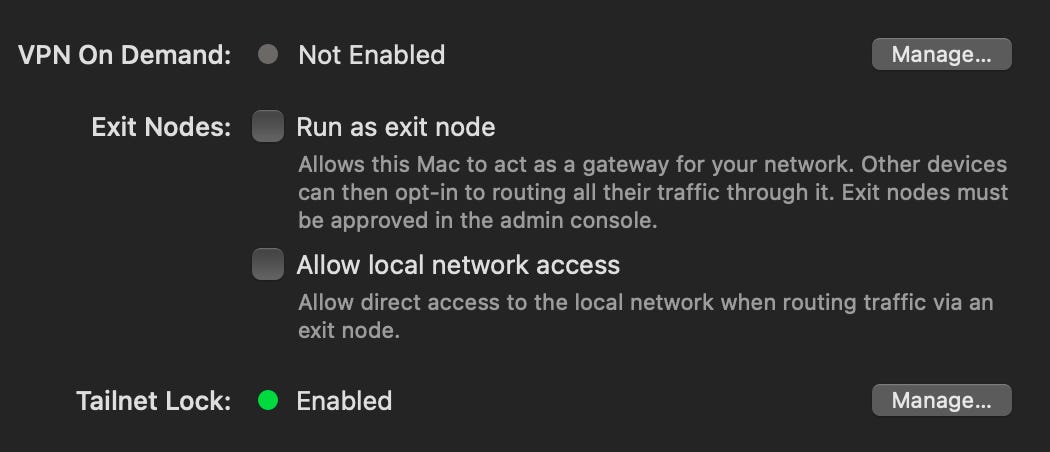
Otherwise, feel free to use an old windows or mac computer. After installing tailsacle all you need to do is check one box in the settings tab:
If you have a GL.iNet device, login to the interface and go to the Tailscale tab under applications:
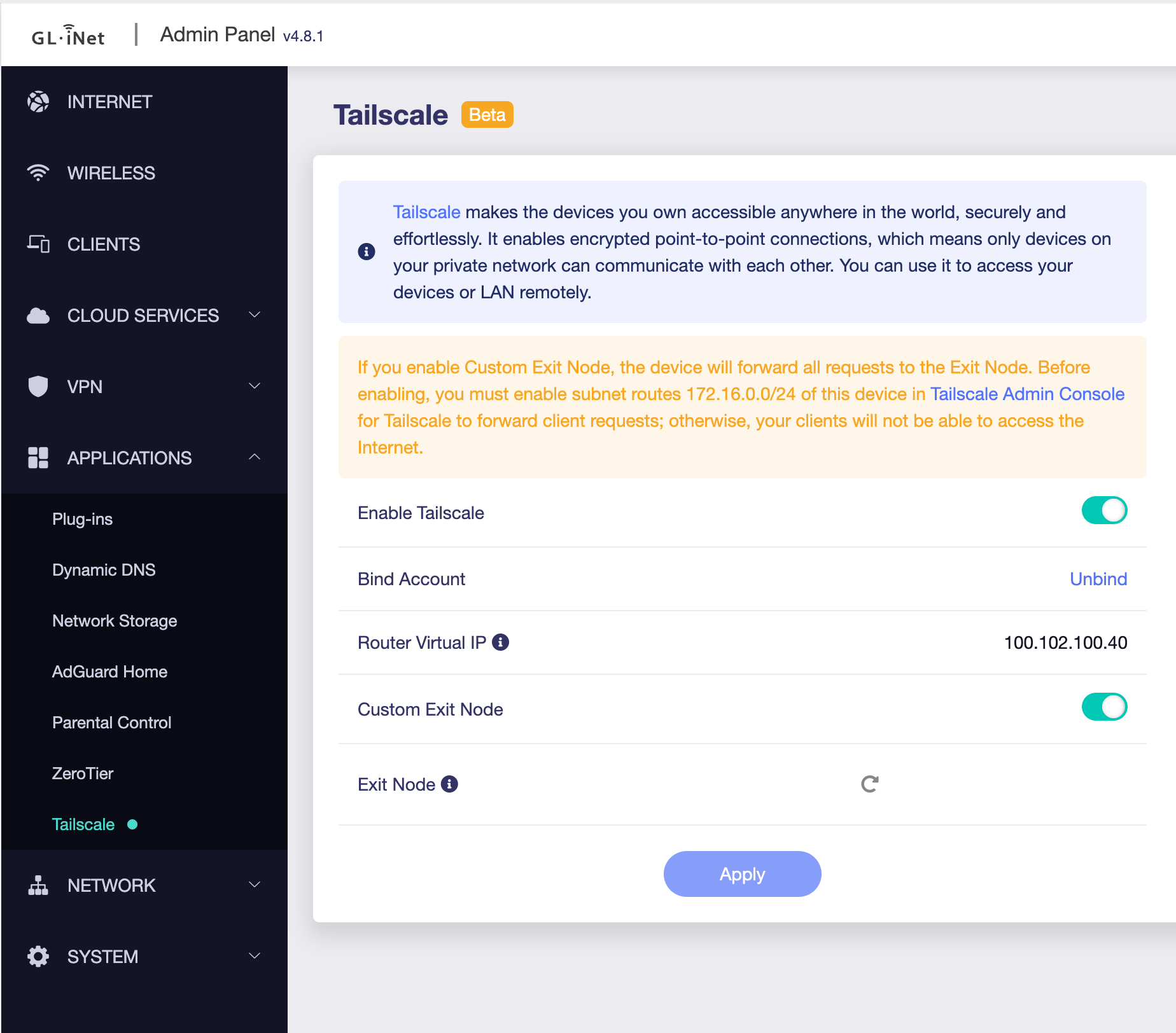
When you first come to this, you toggle to enable tailscale, you click the link and login, and the device is configured. Then you click the refresh icon under “Custom Exit Node” and select the node we started running in the prior step.
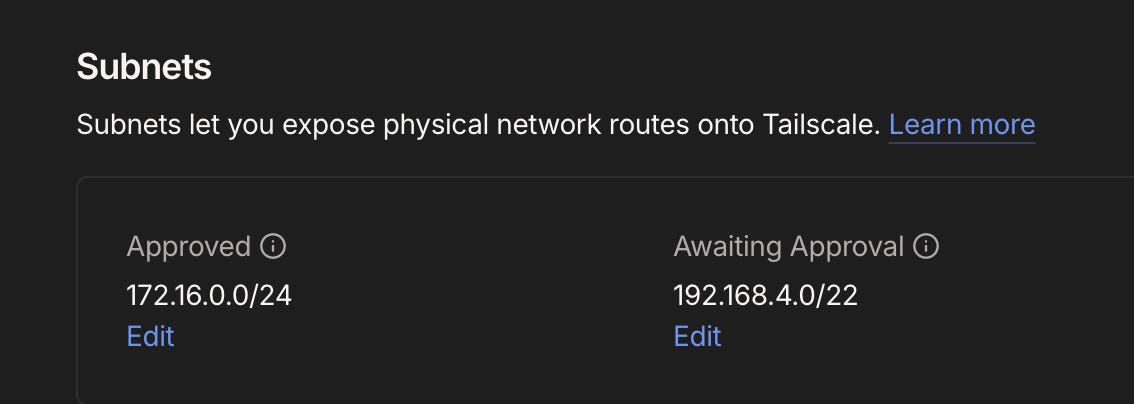
First time after connecting, you need to go to your tailscale dashboard and click on your device and accept the subnet routes from it:
I like to be extra secure, so I actually tag this device in tailscale, set a static IP on the device connected to its ethernet port, and then only allow that single IP to use exit nodes in my network.
That means if they connect another device through it, it can’t go through tailscale, and in addition, that one allowed device can use exit nodes, but will be unable to ping or access any other device in the tailnet.
This goes beyond the “10 minutes” of this tutorial, but I wanted to share it. Tailscale has added ACL tests that validate your firewall rules as well which has been super helpful. Anytime I add a new rule I add a test right after to ensure what I wanted to allow is correctly applied.
Step 4: Profit
It really is that simple, and if you have an Apple TV… it’s even simpler. Install the Tailscale app from the App Store and then scan the QR code displayed to connect.
Enable your exit node and it’ll route everything through your home connection.
I use a travel router and did these exact steps. All I had to tell my family member was “unplug the ethernet cable from your apple tv, put it into this. And then use the other ethernet port to connect to the apple tv.” They actually couldn’t believe it was that easy and were surprised when the app they opened just started working, because it that one only checks your IP, doesn’t even require a login.
I couldn’t let them use the Apple TV directly because the streaming service checks for VPN apps running on device.
Seriously this is getting so easy, a gen z kid that only knows how to use tiktok can do it. Set this up and split the cost of streaming services without having to worry about getting cut off.
One downside…
The worst part is that if you have a service on a crappy ISP like I do… where you only get 30mbps upload speeds, you cant give this out to more than 1-2 people or your upload speed is going to be saturated and not work well.
Thankfully I have multiple ISPs and keep guest networks and this type of stuff on the bad connection, but some of my streaming services are tied to that ISP’s IP so i have to use it for this as well.
Interesting approach! I've been using FastVPN (https://play.google.com/store/apps/details?id=com.namecheap.vpn) to access different regional Netflix libraries and it works really well for that.
Makes it look like I'm in the same location when sharing with family abroad. Pretty straightforward setup.
Sometimes certain servers get detected and need switching, which is annoying.
But overall, solid solution for streaming flexibility. Way simpler than complicated router setups. Works consistently across all my devices!